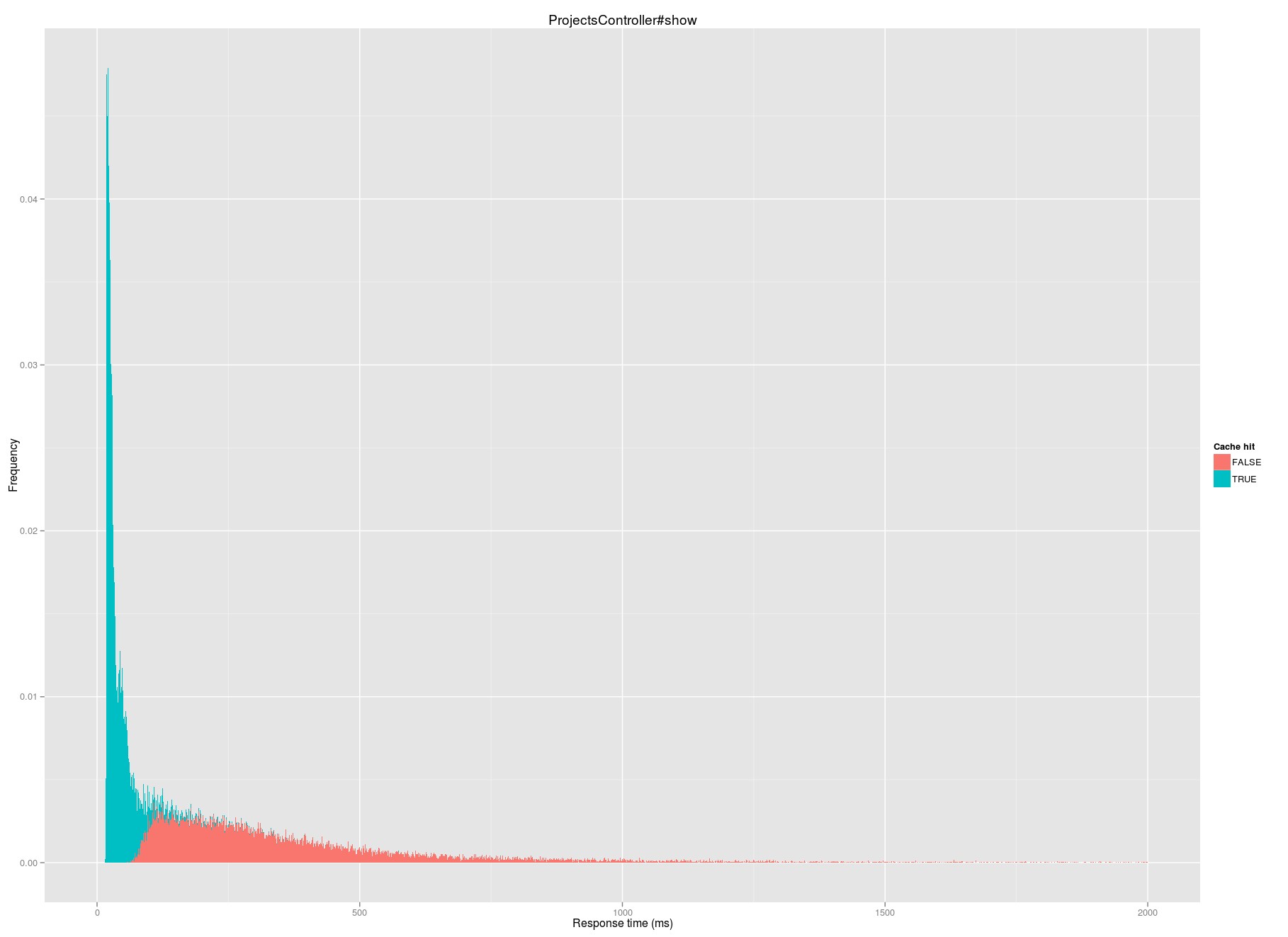
We’ve written before a little bit about how we use Statsd, which was popularized by Etsy about a year ago. It forms the backbone of much of our reporting, monitoring, and analytics, and we process thousands of measurements per second with it.
In college, I worked for a couple of years in a lab that tested the effectiveness of surgical treatments for ACL rupture using industrial robotics. Sometimes, the reconstructions didn’t hold. The surgeons involved were sometimes frustrated; it can be hard to look at data showing that something you did didn’t work. But for the scientists and engineers, all that mattered was that we’d followed our testing protocol and gathered some new data. I came to learn that this attitude is exactly what it takes to be a successful scientist over the long term and not merely a one-hit wonder.
Occasionally, when we’re running an A/B test someone will ask me what I call “success” for a given test. My answer is perhaps a bit surprising to some:
I don’t judge a test based on what feedback we might have gotten about it.
I don’t judge a test based on what we think we might have learned about why a given variation performed.
I don’t judge a test based on the improvement in conversion or any other quantitative measure.
I only judge a test based on whether we designed and administered it properly.
As an industry, we don’t yet have a complete analytical model of how people make decisions, so we can’t know in advance what variations will work. This means that there’s no shame in running variations that don’t improve conversion. We also lack any real ability to understand why a variation may have succeeded, so I don’t care much whether or not we understood the results at a deeper level.
The only thing we can fully control is how we set up the experiment, and so I judge a test based on criteria like:
Did we have clear segmentation of visitors into distinct variations?
Did we have clear, measurable, quantitative outcomes linked to those segments?
Did we determine our sample size using appropriate standards before we started running the test, and run the test as planned, not succumbing to a testing tool’s biased measure of significance?
Can we run the test again and reproduce the results? Did we?
This might sound a lot like the way a chemist evaluates an experiment about a new drug, and that’s not by accident. The way I look at running an A/B test is much the same as I did when I was working in that lab: if you run well-designed, carefully implemented experiments, the rest will take care of itself eventually.
You might hit paydirt this time, or it might take 100 more tests, but all that matters is that you keep trying carefully. I evaluate the success of our overall A/B testing regimen based on whether it improves our overall performance, but not individual tests; individual tests are just one step along what we know will be a much longer road.
One of the things we’ve added to our applications in the last few months is a little gem that (among other things) adds a comment to each MySQL query that is generated by one of our applications.
Now, when we look at our Rails or slow query logs, our MySQL queries include the application, controller, and action that generated them:
Account Load (0.3ms) SELECT `accounts`.* FROM `accounts`
WHERE `accounts`.`queenbee_id` = 1234567890
LIMIT 1
/*application:BCX,controller:project_imports,action:show*/
When we’re trying to improve a slow query, or identify a customer problem, we never have to go digging to understand where the query came from—it’s just right there. This comes in handy in development, support, and operations – we used it during a pre-launch review of unindexed queries in the brand new Basecamp which launched a couple months ago. If you combine this with something like pt-query-digest, you end up with a powerful understanding of how each Rails action interacts with MySQL.
It’s easy to add these comments to your Rails application in a relatively unintrusive way. We’ve released our approach that works in both Rails 2.3.x and Rails 3.x.x apps as a gem, marginalia.
marginalia (mar-gi-na-lia, pl. noun) — marginal notes or embellishments Merriam-Webster
We’ve been using this in production on all of our apps now since December, ranging from Rails 2.3.5 to Rails master and Ruby 1.8.7 to 1.9.3. You should be able to have it running in your application in a matter of minutes.
It’s worth acknowledging that anytime you modify the internals of something outside your direct control there are risks, and that every function call adds some overhead. In our testing, these have both been well worth the tradeoff, but I absolutely encourage you to consider the tradeoff you’re making for yourself every time you instrument or log something. You may certainly have a different set of tradeoffs, and you should absolutely test on your own application.
Have a suggested improvement to our sample code or another way to do this? We’d love to hear it.
Thanks to Taylor for the original idea, and to Nick for helping to extract it into its own gem.
About three weeks ago we launched the all new Basecamp, and it’s been an exciting few weeks.
Since I’m a numbers kind of guy, I wanted to share some things I’ve seen in looking at the new Basecamp that are particularly exciting:
This has been our strongest product launch ever. The new Basecamp is our fifth “big” product launch, and it’s our strongest yet in terms of signups in the period immediately after launch. With two weeks in the books, we had more than 3x more signups than we had in the same period after our last brand new product launch (for Highrise back in 2007). If you go all the way back to Basecamp’s original launch in 2004, signups for the new Basecamp were more than 30 times higher.
We’ve brought in lots of new customers. About a third of new Basecamp accounts immediately after launch were from people who migrated their existing account, and about half were from people who previously held some sort of 37signals account before. While we’re thrilled to see so many of our loyal customers enjoying the new Basecamp, we’re even more excited to see so many new people trying Basecamp for the first time.
Usage is fantastic. On a per account basis, new Basecamp accounts are creating twice as many projects and todo items as on Basecamp Classic, as well as more attachments, messages, comments, calendar events, and more.
We have a great new marketing site. Jamie, Mig, and Jason F. really knocked it out the park with our new public site at basecamp.com. We’ve sustained substantially higher traffic levels from all kinds of sources more than two weeks after launch, and conversion rate is up 76%. We’re always testing new ideas here, but the early results are bright.
Basecamp Classic continues to perform well. Plenty of existing customers continue to use Basecamp Classic. Retention rates haven’t dipped, and usage levels are right where they were before we launched the new Basecamp. This is great news – our strategy of maintaining two separate Basecamps (Classic and new) seems to be working so far with no ill effects.
We’re excited and encouraged by the first few weeks of the all new Basecamp. We have lots of great improvements planned for it in the coming weeks and months – we’re hard at work on a few already.
There’s been somespeculation that we significantly increased the amount of posts here on SvN in the build up to the launch of the new Basecamp, and in particular that we targeted the front page of Hacker News for those articles. Somepeoplearen’thappyaboutthis.
I’d like to bring a little context and fact to bear on this to put these speculations to rest.
In the month before the launch of the new Basecamp, we published 25 posts here on Signal vs. Noise. For comparison, during the same period in prior years, we published (before 2007 we used a different blogging engine, so I don’t have those numbers handy):
29 posts in 2011
50 posts in 2010
36 posts in 2009
49 posts in 2008
42 posts in 2007
Relatively speaking, this was actually a pretty low level of posting activity for us. During all the years prior to this one in that period, we were also maintaining a separate product blog, whose posts aren’t included in these totals.
During that period, there were 24,826 first time visitors to any of our sites who we could identify as having first gotten to us via Hacker News (in all, we received more like 105,000 unique visitors from Hacker News, but many of those were repeat visitors). 97 of those visitors signed up, with more than 85% of them electing the free plan. This conversion rate pales compared to our average conversion rate, particularly for non-search-engine traffic.
When all is said and done, what’s our likely financial outcome from Hacker News visitors for those 25 posts? About $300 total per month.
We typically write on SvN because we have an announcement to make, or because we have something we’re thinking about that we’d like to share.
Do we benefit from other people noticing our blog posts and linking them up from their blogs or other outlets? Absolutely – we’ve been talking about the power of word-of-mouth marketing for almost a decade.
As a writer, do I like it when more people read what I’ve written? Sure.
Is there any business value for us in getting on the front page of Hacker News? Not really.
Upvote us, downvote us, ignore us – I don’t care, but I hope you’ll make that decision based on the merits of the content of a given post, not because you think we’re trying to manipulate the front page of Hacker News for our gain.
What would you say if I told you that you could get more precise, actionable, and useful information about how your Rails application is performing than any third party service or log parsing tool with just a few hours of work?
For years, we’ve used third party tools like New Relic in all of our apps, and while we still use some of those tools today, we found ourselves wanting more – more information about the distribution of timing, more control over what’s being measured, a more intuitive user interface, and more real-time access to data when something’s going wrong.
Fortunately, there are simple, minimally-invasive options that are available virtually for “free” in Rails. If you’ve ever looked through Rails log files, you’ve probably seen lines like:
Feb 7 11:27:49 bc-06 basecamp[16760]: [projects] Person Load (0.5ms) SELECT `people`.* FROM `people` WHERE `people`.`id` = ? LIMIT 1
Feb 7 11:27:49 bc-06 basecamp[16760]: [projects] Rendered events/_post.rhtml (0.4ms)
Feb 7 11:27:50 bc-06 basecamp[16760]: [projects] Rendered project/index.erb within layouts/in_global (447.2ms)
Feb 7 11:27:50 bc-06 basecamp[16760]: [projects] Completed 200 OK in 529ms (Views: 421.7ms | ActiveRecord: 58.0ms)
You could try to parse these log files, or you could tap into Rails’ internals to extract just the numbers, but both of those are somewhat difficult and open up a lot of areas for things to go wrong. Fortunately, in Rails 3, you can get all this information and more in whatever form you want with just a few lines of code.
All the details you could want to know, after the jump…
It goes without saying that we use Rails a lot here at 37signals. Often times, when we look at a problem, we turn to Rails or something similar, because when you have a high-performance precision screwdriver, everything starts to look like a finely engineered screw. Sometimes, what you really need is a big hammer, because what you’re looking at is a nail.
Let me tell you about our journey with these sites over the years, and how we’ve landed on a simple solution that boosted conversion rate by about 5%.
Good enough
There’s nothing particularly dynamic about these sites; we might throw a “Happy Monday” in there, or we might make some tweaks based on a URL parameter, and we A/B test them extensively, but there’s no database or background services involved.
Stretching back to the pre-Basecamp days, the 37signals.com site was written with PHP. There was no Rails back then, Ruby wasn’t commonly used for web development, and DHH and others worked in PHP, so it was the logical choice. As we added sites, they continued to use PHP since it was fast and easy. This worked well for years and years—our public sites were relatively performant and rock-stable, and we didn’t really have many problems. The biggest pain was in setting up for local development, which ended up being quite the pain to get set up in OS X in a way that behaved well with Pow, Passenger, etc.
Getting better
A few years ago, Sam Stephenson and Josh Peek wrote Brochure as a way to translate our marketing sites to Rack apps. This solved the local development challenges, and let us use a language we were all generally more comfortable with. It was a little slower than PHP, and meant dealing with Passenger on deployment, but it was a fair compromise at the time. We moved one site to brochure, and then ran out of steam to move the rest – work on our applications took a higher priority.
A few months ago I took a serious look at our public sites’ performance. They were making a lot of requests for individual assets and page load times were pretty poor – Basecamp itself loaded much faster than the essentially static signup page for it. Local setup problems with the PHP sites also meant that it was harder to work on the sites, and so we were less productive and less inclined to work on them.
Back to the basics for fun and profit
Our solution to this (in addition to spriting images and cleaning up unused styles and Javascript) was to switch to using totally static HTML pages. We’re using the stasis gem to compile .html.erb files locally and on deploy, along with Sprockets to pre-process and concatenate stylesheets and Javascript. Our web server ends up serving plain old HTML and a single CSS and Javascript file, with no interpretation.
This makes local development easy, and what you see locally is always what will be deployed. This also makes it trivial to distribute the marketing site to multiple datacenters or distribution networks around the world—just upload the compiled files, rather than worrying about dependencies for running an interpreted site.
While we haven’t done that yet, just from some mild spriting and cleanup and moving to static HTML, we shaved about half a second off the total load time for basecamphq.com, and saw about a 5% improvement in conversion rate result from that (the link between page speed and conversion rate has been studied more rigorously as well by the likes of Google, Amazon, etc.).
I recently read and watched “Moneyball”, and enjoyed both greatly. It’s a great story in and of itself, but I also found it to be an interesting parallel to the state of the “web software” industry today.
Moneyball starts in the week before the 2002 baseball draft, with a set of meetings that pit Oakland A’s general manager Billy Beane against his team of scouts. The scouts’ primary mechanism of evaluating players was visual – did the guy look, walk, and talk like a major league baseball player? On the other hand, Billy, with his assistant Paul DePodesta, had a largely objective system for evaluating baseball players based on things like how often they got on base.
Billy won the fight over talent selection and picked players that met his system, even if his scouts disagreed. This pattern continued throughout the season, and the A’s went on to set a league record for consecutive wins.
When I started writing I thought if I proved X was a stupid thing to do people would stop doing X. I was wrong.
—Bill James in his 1984 Baseball Abstract
In many ways, the “web software” industry is still where these scouts are. For most people, the primary way of evaluating their software is with their own eyes and emotions. Over the years, people have tried to bring some objectivity or framework to do thing this with things like “personas”, but the process is still a largely subjective one, just like a scout looking at how a player swings and never really looking at whether he gets on base.
The reality, of course, is that this is no longer necessary. Just like baseball in the years since Bill James coined “sabermetrics”, we have the tools now as an industry to do better. We can identify the outcomes we want to see, and we can objectively evaluate a design in the context of those outcomes.
It’s never been easier to test your designs and find out what works where the rubber meets the road. You can use a tool like Optimizely for any site or something like A/Bingo in a Rails app and have a test running in a matter of minutes. Measuring and understanding behavior in other ways has also never been easier—there are new tools and startups helping to do this every week.
For Billy Beane and the Oakland A’s, using data was about leveling the playing field between their meager salary budget and the huge budget of teams in places like New York and Boston. For the web industry, the playing field is already fairly level – it doesn’t take much more than a web browser and a text editor to build something. What data does for web software is reduce the role that blind luck plays. You’re more likely to – on average – find success if you evaluate your work using real data about the outcomes that matter.
You can choose to keep working like those scouts did and go on gut instinct alone. It might work for a while, but I think most people would say that baseball’s moving forward now, and the people who haven’t made the switch are being left behind. Our industry will move forward too—do you want to be left behind?
First, some numbers to give a little context to what we mean by “a lot” of email. In the last 7 days, we’ve sent just shy of 16 million emails, with approximately 99.3% of them being accepted by the remote mail server.
Email delivery rate is a little bit of a tough thing to benchmark, but by most accounts we’re doing pretty well at those rates (for comparison, the tiny fraction of email that we use a third party for has had between a 96.9% and 98.6% delivery rate for our most recent mailings).
How we send email
We send almost all of our outgoing email from our own servers in our data center located just outside of Chicago. We use Campaign Monitor for our mailing lists, but all of the email that’s generated by our applications is sent from our own servers.
We run three mail-relay servers running Postfix that take mail from our application and jobs servers and queue it for delivery to tens of thousands of remote mail servers, sending from about 15 unique IP addresses.
How we monitor delivery
We have developed some instrumentation so we can monitor how we are doing on getting messages to our users’ inbox. Our applications tag each outgoing message with a unique header with a hashed value that gets recorded by the application before the message is sent.
To gather delivery information, we run a script that tails the Postfix logs and extracts the delivery time and status for each piece of mail, including any error message received from the receiving mail server, and links it back to the hash the application stored. We store this information for 30 days so that our fantastic support team is able to help customers track down why they may not have received an email.
We also send these statistics to our statsd server so they can be reported through our metrics dashboard. This “live” and historical information can then be used by our operations team to check how we’re doing on aggregate mail delivery for each application.
Why run your own mail servers?
Over the last few years, at least a dozen services that specialize in sending email have popped up, ranging from the bare-bones to the full-service. Despite all these “email as a service” startups we’ve kept our mail delivery in-house, for a couple of reasons:
We don’t know anyone who could do it better. With a 99.3% delivery rate, we haven’t found a third party provider that actually does better in a way they’re willing to guarantee.
Setup hassle Most of the third party services require that you verify each address that sends email by clicking a link that gets sent to that address. We send email from thousands and thousands of email addresses for our products, and the hassle of automatically registering and confirming them is significant. Automating the process still introduces unnecessary delivery delays.
Given all this, why should we pay someone tens of thousands of dollars to do it? We shouldn’t, and we don’t.
Read more about how we keep delivery rates high after the jump…
Over the last 20 years, my primary computing environment has gone from Windows 3.1, to Mac OS 6/7/8/9, to Windows for about a decade, and then back to a Mac a couple of years ago. Recently, I switched to using a Linux desktop as my primary computer. I can’t say that there’s a dramatic reason why I switched (it’s not some political statement about free and open source software); I just wanted to use some hardware that was impractical to get from Apple.
Something crazy happened when I switched: absolutely nothing changed.
I basically used three programs on the Mac: Google Chrome (web browsing), iTerm (terminal), and Adium (IM). Now, I use Google Chrome (web browsing), Terminator (terminal), and Empathy (IM). Switching was a matter of copying over a couple of directories and configuration files and connecting Chrome and Dropbox to sync. When I wanted to do some real work, getting my development environment running for our applications was just as easy as on a Mac.
Perhaps surprisingly to some people, Linux hardware support has improved to the point that everything worked perfectly out of the box, just like on a Mac. In a shift from what David saw a few years ago, and despite being largely panned by critics, I find the stock interface in Ubuntu 11.10 to be just as nice as Mac OS X Lion.
I’m just as productive on Linux as I was on OS X, and there’s no reason you couldn’t be too if you wanted or needed to switch. All you need these days to build great things is a browser, a text editor, and the programming language or tool of your choice. As long as it works for you, it really doesn’t matter whether you build your killer social-media-photo-sharing-Facebook-tweeting app on OS X, Linux, or Windows.
Today we’re bringing autosave to Basecamp (for messages and comments), Highrise (for notes), Backpack (for messages, comments, and notes), and Writeboard (for documents and comments), as well as right here on SvN.
Autosave keeps a local copy of your work in your browser’s storage as you write, so you’re always protected against accidental refreshes, closing the wrong tab, a browser crash, or clicking a link that opens in the same window. The local copy will be kept in your browser’s local storage until you submit that message or comment.
If you accidentally close your browser or refresh the page, everything you’ve typed will be restored automatically when you return. You don’t have to do anything, it just works.
Autosave works with modern browsers: Internet Explorer 9+, Firefox 3.5+, Chrome 4.0+, and Safari 4.0+. If you’re not already using one of these versions, now’s a great time to upgrade!
We hope this gives you even more confidence in working with our products. Losing something while you’re writing it stinks – hopefully this helps cut those incidents down dramatically.